

What is Microsoft Teams?
Work together how you want, when you want. Create and collaborate on documents with others and keep everyone organized and up-to-date with shared notebooks.
Company Details
Need Assistance?
We're here to help you with understanding our reports and the data inside to help you make decisions.
Get AssistanceMicrosoft Teams Ratings
Real user data aggregated to summarize the product performance and customer experience.
Download the entire Product Scorecard
to access more information on Microsoft Teams.
Product scores listed below represent current data. This may be different from data contained in reports and awards, which express data as of their publication date.
90 Likeliness to Recommend
97 Plan to Renew
84 Satisfaction of Cost Relative to Value
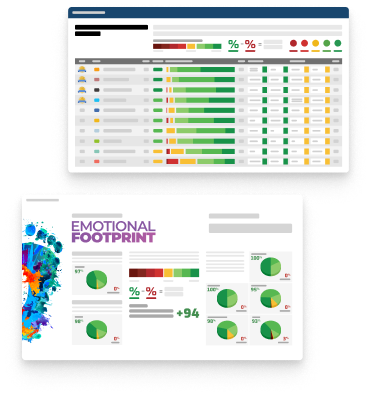
Emotional Footprint Overview
Product scores listed below represent current data. This may be different from data contained in reports and awards, which express data as of their publication date.
+90 Net Emotional Footprint
The emotional sentiment held by end users of the software based on their experience with the vendor. Responses are captured on an eight-point scale.
How much do users love Microsoft Teams?
Pros
- Fair
- Reliable
- Enables Productivity
- Respectful
How to read the Emotional Footprint
The Net Emotional Footprint measures high-level user sentiment towards particular product offerings. It aggregates emotional response ratings for various dimensions of the vendor-client relationship and product effectiveness, creating a powerful indicator of overall user feeling toward the vendor and product.
While purchasing decisions shouldn't be based on emotion, it's valuable to know what kind of emotional response the vendor you're considering elicits from their users.
Footprint
Negative
Neutral
Positive
Feature Ratings
Collaboration
Calendars
File Sharing Collaboration
Mobile App
Employee Engagement
Task Management
Content Management
Employee Directory
Workflow & Approvals
Networked Enterprise
Virtual Offices
Vendor Capability Ratings
Business Value Created
Ease of Implementation
Breadth of Features
Quality of Features
Usability and Intuitiveness
Ease of IT Administration
Ease of Data Integration
Product Strategy and Rate of Improvement
Availability and Quality of Training
Ease of Customization
Vendor Support
Also Featured in...
Unified Communications as a Service
Score 8.9
View Microsoft Teams in this category (opens in a new tab)
Web and Video Conferencing - Enterprise
Score 8.8
View Microsoft Teams in this category (opens in a new tab)
Business Instant Messaging - Enterprise
Score 8.8
View Microsoft Teams in this category (opens in a new tab)
Microsoft Teams Reviews

Saksham K.
- Role: Information Technology
- Industry: Other
- Involvement: IT Development, Integration, and Administration
Submitted Oct 2024
Marvelous Product 🌟
Likeliness to Recommend
What differentiates Microsoft Teams from other similar products?
Microsoft Teams stands out with its deep integration into the Microsoft 365 ecosystem, offering seamless collaboration with apps like Word, Excel, and Outlook. It also provides robust security features, enterprise-grade compliance, and highly customizable workflows for diverse organizational needs.
What is your favorite aspect of this product?
My favorite aspect of Microsoft Teams is its seamless integration with Microsoft 365 apps, making collaboration and productivity effortless.
What do you dislike most about this product?
Takes time to load GIF.
What recommendations would you give to someone considering this product?
I recommend ensuring your team is familiar with Microsoft 365 apps to fully leverage Teams' integration. Start with the basic features, gradually exploring advanced tools like automation and third-party app integrations for improved workflows.
Pros
- Helps Innovate
- Continually Improving Product
- Reliable
- Performance Enhancing
Please tell us why you think this review should be flagged.

Maxwell M.
- Role: Sales Marketing
- Industry: Manufacturing
- Involvement: End User of Application
Submitted Oct 2024
Cornerstone of Workplace Collaboration.
Likeliness to Recommend
What differentiates Microsoft Teams from other similar products?
Microsoft Teams has become a cornerstone of workplace collaboration, particularly as remote work has surged in popularity. One of its. Versatile standout feature is is rubus communication that enables teams to combine chat, video conferencing, and file sharing into a single platform. The ability to switch between these modes effortlessly makes communication fluid and efficient. Overall, this features makes Teams a powerful tool ally in fostering teamwork.
What is your favorite aspect of this product?
One of Team's standout features is it's deep integration with Microsoft 355 applications. This enables users to easily collaborate on documents in real-time using Word, Excel, and SharePoint, enhancing productivity and streamlining workflows. Robust collaboration tools, like thread conversations, mentions, and file versioning which boost organized discussion and easy access to shared documents.
What do you dislike most about this product?
Limited third-party integrations compared to other tools that has wider and broader range of third-party apps integrations.
What recommendations would you give to someone considering this product?
Microsoft Teams is an excellent choice for organizations seeking a comprehensive collaboration tool.
Pros
- Helps Innovate
- Continually Improving Product
- Reliable
- Performance Enhancing
Please tell us why you think this review should be flagged.

Satyanshu S.
- Role: Information Technology
- Industry: Technology
- Involvement: IT Leader or Manager
Submitted Oct 2024
Fantastic product!
Likeliness to Recommend
What differentiates Microsoft Teams from other similar products?
Cross-Platform Compatibility, Linked In-Meeting Collaboration Tools, Scale and Flexibility, Threaded Conversations and Channels, Third-Party App Integrations, Customizable with Power Platform, Security and Compliance, Video Conferencing and Meetings, All-in-One Platform, Collaboration in Real-Time, Deep Integration with Microsoft 365. Overall, Teams’ close integration with Microsoft 365, along with its robust feature set that spans messaging, video calls, and file collaboration, makes it a leading choice for businesses looking for an all-in-one communication and collaboration tool.
What is your favorite aspect of this product?
My favorite aspect of Microsoft Teams is its deep integration with Microsoft 365. This integration allows for seamless collaboration on documents, scheduling meetings, and managing tasks without switching between different apps. Being able to co-edit Word documents, analyze Excel sheets, or present PowerPoint slides directly within Teams meetings or channels is incredibly efficient. This unified ecosystem streamlines workflows and boosts productivity, making it easy for teams to collaborate in real time while leveraging the full power of Microsoft’s suite of tools.
What do you dislike most about this product?
I dislike most about Microsoft Teams is its overwhelming notification system. Notifications can quickly pile up, especially in larger teams or organizations where multiple channels, chats, and tasks are active. This makes it difficult to prioritize what's important without feeling distracted. Additionally, managing and filtering notifications within the app could be more intuitive. A more advanced, customizable notification system that allows users to better organize and mute irrelevant alerts would greatly improve the overall user experience.
What recommendations would you give to someone considering this product?
Leverage Microsoft 365 Integration, Organize Channels Effectively, Manage Notifications
Pros
- Helps Innovate
- Continually Improving Product
- Reliable
- Performance Enhancing
Please tell us why you think this review should be flagged.





Get Instant Access<br>to this Report
Get Instant Access
to this Report
Unlock your first report with just a business email. Register to access our entire library.
© 2026 SoftwareReviews.com. All rights reserved.