

What is Microsoft Teams?
Work together how you want, when you want. Create and collaborate on documents with others and keep everyone organized and up-to-date with shared notebooks.
Company Details
Need Assistance?
We're here to help you with understanding our reports and the data inside to help you make decisions.
Get AssistanceMicrosoft Teams Ratings
Real user data aggregated to summarize the product performance and customer experience.
Download the entire Product Scorecard
to access more information on Microsoft Teams.
Product scores listed below represent current data. This may be different from data contained in reports and awards, which express data as of their publication date.
90 Likeliness to Recommend
97 Plan to Renew
84 Satisfaction of Cost Relative to Value
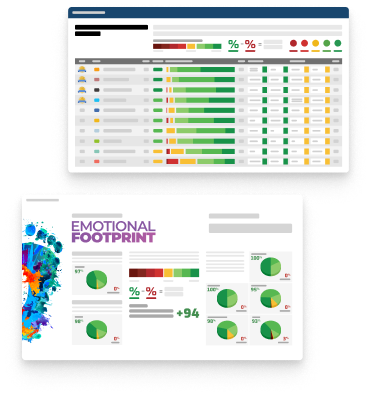
Emotional Footprint Overview
Product scores listed below represent current data. This may be different from data contained in reports and awards, which express data as of their publication date.
+90 Net Emotional Footprint
The emotional sentiment held by end users of the software based on their experience with the vendor. Responses are captured on an eight-point scale.
How much do users love Microsoft Teams?
Pros
- Fair
- Reliable
- Enables Productivity
- Respectful
How to read the Emotional Footprint
The Net Emotional Footprint measures high-level user sentiment towards particular product offerings. It aggregates emotional response ratings for various dimensions of the vendor-client relationship and product effectiveness, creating a powerful indicator of overall user feeling toward the vendor and product.
While purchasing decisions shouldn't be based on emotion, it's valuable to know what kind of emotional response the vendor you're considering elicits from their users.
Footprint
Negative
Neutral
Positive
Feature Ratings
Collaboration
Calendars
File Sharing Collaboration
Mobile App
Employee Engagement
Task Management
Content Management
Employee Directory
Workflow & Approvals
Networked Enterprise
Virtual Offices
Vendor Capability Ratings
Business Value Created
Ease of Implementation
Breadth of Features
Quality of Features
Usability and Intuitiveness
Ease of IT Administration
Ease of Data Integration
Product Strategy and Rate of Improvement
Availability and Quality of Training
Ease of Customization
Vendor Support
Also Featured in...
Unified Communications as a Service
Score 8.9
View Microsoft Teams in this category (opens in a new tab)
Web and Video Conferencing - Enterprise
Score 8.8
View Microsoft Teams in this category (opens in a new tab)
Business Instant Messaging - Enterprise
Score 8.8
View Microsoft Teams in this category (opens in a new tab)
Microsoft Teams Reviews

Matt D.
- Role: Sales Marketing
- Industry: Technology
- Involvement: End User of Application
Submitted May 2026
Hub for Team Communication.
Likeliness to Recommend
What differentiates Microsoft Teams from other similar products?
It keeps all of my passwords, Excel, Outlook all open in one place. As marketing people, we need a lot of Excel and other tools to access so this proves to be very useful. We have a separate channel for each client in our agency. But the problem is that sometimes I forget which channel is for whom. It takes time to learn.
What is your favorite aspect of this product?
What I like most is its calendar and meeting scheduling feature. I open my Outlook first thing in the morning and the meetings there automatically appear in Teams. There are a lot of meetings in my day to day use that I have to cater for. Another great thing about this tools is its screen sharing where we easily and remotely share screens with each other.
What do you dislike most about this product?
I mostly get fed up with its notifications system. When I am working in a channel, I keep getting twenty messages from other channels. I do mute everyone but it also makes me miss the important messages as well. The sound is intermittent, the picture freezes. I have seen this problem less in Zoom. Microsoft Teams also does seems to consume a lot of data.
What recommendations would you give to someone considering this product?
The tip is to set the notifications at the beginning. I didn't do it, so now the phone rings every five minutes. My mind gets tired by evening. Keep only the important channels on, turn everything else off. This is my experience using which you can save yourself a little.
Pros
- Helps Innovate
- Reliable
- Performance Enhancing
- Enables Productivity
Please tell us why you think this review should be flagged.

Pranav S.
- Role: Sales Marketing
- Industry: Media
- Involvement: End User of Application
Submitted Apr 2026
Powerful but overcomplicated.
Likeliness to Recommend
What differentiates Microsoft Teams from other similar products?
The Microsoft 365 integration is the real differentiator. Being able to pull up a Word doc, edit it with someone live, and have the changes sync without leaving the call is genuinely useful. SharePoint, Outlook, and Teams all talk to each other in a way that Google's ecosystem doesn't quite match and Zoom doesn't attempt. If your org is already on Microsoft, Teams makes that investment go further.
What is your favorite aspect of this product?
Co-authoring documents during a call. I can share a deck, someone edits a slide while we're talking, and both versions don't conflict. It sounds basic but getting that to work smoothly across an organization is hard, and Teams handles it well. That single workflow has replaced a lot of back-and-forth email for my team.
What do you dislike most about this product?
The app is heavy and the interface punishes you for it. It's slow to load, slow to search, and slow to switch between teams. The navigation logic also feels like it was designed by committee things are where you wouldn't expect them, and that doesn't improve much with updates. New users consistently need hand-holding just to find basic settings.
What recommendations would you give to someone considering this product?
Only commit if you're already deep in the Microsoft ecosystem. If your org runs on 365, Teams is worth it despite the rough edges. If you're not, the integration benefits disappear and you're left with a bloated video tool that Zoom or Meet does more cleanly. Don't adopt it for the features alone.
Pros
- Helps Innovate
- Trustworthy
- Effective Service
- Fair
Please tell us why you think this review should be flagged.

Priya G.
- Role: Information Technology
- Industry: Transportation
- Involvement: End User of Application
Submitted Apr 2026
Excellent for automated workflows
Likeliness to Recommend
What differentiates Microsoft Teams from other similar products?
I love how well teams works with power automate. i have a "flow" where each time a client completes a form on our website i get a notification on my sales channel. it's better than other apps because the automation is integrated and doesn't require any ugly third party apps. it saves me hours a week of manually entering data.
What is your favorite aspect of this product?
I just love the "slash commands" it’s so much faster to just type "/busy" or "/find" for someone without having to use the mouse. it's a great feature that makes the app much "hipper". the reactions also are way cooler to use any emoji.
What do you dislike most about this product?
The linux version of teams is pretty terrible. it has limited features and doesn't feel like a "real" version of teams.
What recommendations would you give to someone considering this product?
If you're all about automating team tasks its the best tool out there.
Pros
- Helps Innovate
- Inspires Innovation
- Saves Time
- Fair
Please tell us why you think this review should be flagged.





Get Instant Access<br>to this Report
Get Instant Access
to this Report
Unlock your first report with just a business email. Register to access our entire library.
© 2026 SoftwareReviews.com. All rights reserved.