

What is Microsoft Power Query?
Power Query is a data transformation and data preparation engine. Power Query comes with a graphical interface for getting data from sources and a Power Query Editor for applying transformations. Because the engine is available in many products and services, the destination where the data will be stored depends on where Power Query was used. Using Power Query, you can perform the extract, transform, and load (ETL) processing of data.
Company Details
Need Assistance?
We're here to help you with understanding our reports and the data inside to help you make decisions.
Get AssistanceMicrosoft Power Query Ratings
Real user data aggregated to summarize the product performance and customer experience.
Download the entire Product Scorecard
to access more information on Microsoft Power Query.
Product scores listed below represent current data. This may be different from data contained in reports and awards, which express data as of their publication date.
89 Likeliness to Recommend
96 Plan to Renew
82 Satisfaction of Cost Relative to Value
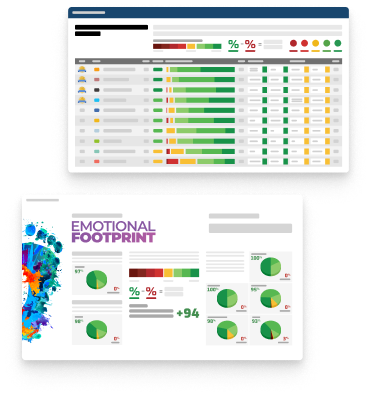
Emotional Footprint Overview
Product scores listed below represent current data. This may be different from data contained in reports and awards, which express data as of their publication date.
+92 Net Emotional Footprint
The emotional sentiment held by end users of the software based on their experience with the vendor. Responses are captured on an eight-point scale.
How much do users love Microsoft Power Query?
Pros
- Performance Enhancing
- Reliable
- Enables Productivity
- Respectful
How to read the Emotional Footprint
The Net Emotional Footprint measures high-level user sentiment towards particular product offerings. It aggregates emotional response ratings for various dimensions of the vendor-client relationship and product effectiveness, creating a powerful indicator of overall user feeling toward the vendor and product.
While purchasing decisions shouldn't be based on emotion, it's valuable to know what kind of emotional response the vendor you're considering elicits from their users.
Footprint
Negative
Neutral
Positive
Feature Ratings
Data Integration
Data Cleansing
Data Pre-Processing
Data Access
Data Connectors and Data Mashup
Data Profiling
Data Modelling Tools
Data Enrichment
Data Security & Masking
Data Packaging
Message Model
Vendor Capability Ratings
Business Value Created
Ease of Data Integration
Ease of Implementation
Breadth of Features
Quality of Features
Usability and Intuitiveness
Ease of IT Administration
Product Strategy and Rate of Improvement
Vendor Support
Ease of Customization
Availability and Quality of Training
Microsoft Power Query Reviews

Matilda A.
- Role: Operations
- Industry: Communications
- Involvement: Business Leader or Manager
Submitted Apr 2025
Solid for Basic Tasks, But Limited for Complex Dat
Likeliness to Recommend
What differentiates Microsoft Power Query from other similar products?
Microsoft Power Query differentiates itself from other data transformation tools primarily through its seamless integration with the Microsoft ecosystem, including Excel, Power BI, and other Microsoft applications.
What is your favorite aspect of this product?
My favorite aspect of Microsoft Power Query is its seamless integration with the Microsoft ecosystem. Since it works so well with tools like Excel and Power BI, it makes data transformation and analysis a smooth, efficient process without needing to jump between different platforms.
What do you dislike most about this product?
What I dislike most about Microsoft Power Query is that it can feel a bit restrictive when working with complex data sources or non-Microsoft platforms. While it’s great for integrating with Microsoft tools, connectivity to certain third-party or niche data sources can be a bit cumbersome or limited.
What recommendations would you give to someone considering this product?
If you’re considering Microsoft Power Query, I recommend taking full advantage of its seamless integration with the Microsoft ecosystem. It works best if you’re already using tools like Excel or Power BI.
Pros
- Helps Innovate
- Continually Improving Product
- Enables Productivity
- Trustworthy
Please tell us why you think this review should be flagged.

Varun Mohan S.
- Role: Consultant
- Industry: Engineering
- Involvement: Business Leader or Manager
Submitted Mar 2025
Power Query-Powerful tool for data prep/transform
Likeliness to Recommend
What differentiates Microsoft Power Query from other similar products?
The capability for managing the large data source may it be excel workbooks, Database (DB) or other data services. It helps in extracting and transforming as per requirements.
What is your favorite aspect of this product?
Its ability to integrate with excel and powerBi which comes handy for most of the time.
What do you dislike most about this product?
Nothing as per my requirement thus far.
What recommendations would you give to someone considering this product?
Anyone working with database manipulation from any service, Power Query is excellent wat to go.
Pros
- Reliable
- Performance Enhancing
- Enables Productivity
- Inspires Innovation
Please tell us why you think this review should be flagged.

Adedotun A.
- Role: Information Technology
- Industry: Technology
- Involvement: IT Development, Integration, and Administration
Submitted Mar 2025
A versatile but Microsoft-centric data tool
Likeliness to Recommend
What differentiates Microsoft Power Query from other similar products?
It’s integration into excel and power BI which makes refreshing data seamless in those tools, great formula based approach.
What is your favorite aspect of this product?
Ease of use when working with Excel and Power BI, and constant features improvement.
What do you dislike most about this product?
Real time data processing is limited and it’s limited use outside the Microsoft ecosystem.
What recommendations would you give to someone considering this product?
If you’re working with Excel and Power BI and need an easy tool for data transformation, Power Query is the best option.
Pros
- Continually Improving Product
- Reliable
- Performance Enhancing
- Enables Productivity
Cons
- Leverages Incumbent Status
Please tell us why you think this review should be flagged.






Get Instant Access<br>to this Report
Get Instant Access
to this Report
Unlock your first report with just a business email. Register to access our entire library.
© 2026 SoftwareReviews.com. All rights reserved.