

What is Google Forms?
Create custom forms for surveys and questionnaires at no extra cost. Gather everything in a spreadsheet and analyze data right in Google Sheets.
Company Details
Need Assistance?
We're here to help you with understanding our reports and the data inside to help you make decisions.
Get AssistanceGoogle Forms Ratings
Real user data aggregated to summarize the product performance and customer experience.
Download the entire Product Scorecard
to access more information on Google Forms.
Product scores listed below represent current data. This may be different from data contained in reports and awards, which express data as of their publication date.
91 Likeliness to Recommend
99 Plan to Renew
89 Satisfaction of Cost Relative to Value
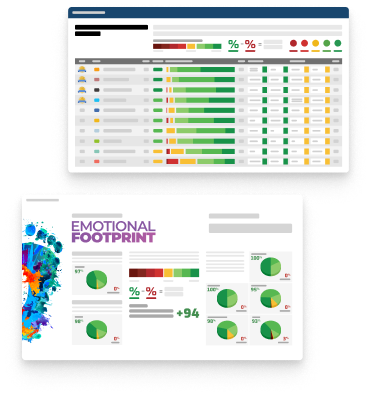
Emotional Footprint Overview
Product scores listed below represent current data. This may be different from data contained in reports and awards, which express data as of their publication date.
+94 Net Emotional Footprint
The emotional sentiment held by end users of the software based on their experience with the vendor. Responses are captured on an eight-point scale.
How much do users love Google Forms?
Pros
- Reliable
- Respectful
- Fair
- Acts with Integrity
How to read the Emotional Footprint
The Net Emotional Footprint measures high-level user sentiment towards particular product offerings. It aggregates emotional response ratings for various dimensions of the vendor-client relationship and product effectiveness, creating a powerful indicator of overall user feeling toward the vendor and product.
While purchasing decisions shouldn't be based on emotion, it's valuable to know what kind of emotional response the vendor you're considering elicits from their users.
Footprint
Negative
Neutral
Positive
Feature Ratings
Collaboration
Mobile Support
Questionnaire Design/Survey Builder
Role and User Management
Templates & Question Library
3rd-Party Integrations
Branching and Logic
Data Analysis and Visualization
Multi-Channel Distribution
APIs and Integration
Customizable Branding
Vendor Capability Ratings
Ease of Implementation
Business Value Created
Usability and Intuitiveness
Ease of Customization
Availability and Quality of Training
Quality of Features
Ease of IT Administration
Ease of Data Integration
Vendor Support
Breadth of Features
Product Strategy and Rate of Improvement
Also Featured in...
Google Forms Reviews

Sushant C.
- Role: Information Technology
- Industry: Technology
- Involvement: End User of Application
Submitted Mar 2026
no nonsense form builder that works
Likeliness to Recommend
What differentiates Google Forms from other similar products?
Forms google wins because it doesn't have the clutter of pro features that i won't ever use. google forms is the best because it is lightweight, and it loads fast even with slow connection speeds. i use google forms for everything from internal employee surveys to customer satisfaction polls. the fact that i can see result of the form as a pie chart instantly is a huge benefit to quick presentations. google forms is the most straightforward tool i've found in everything i do.
What is your favorite aspect of this product?
I really like the ease of sharing. i can just send a link, an email, a qr code even. the interface for adding questions is very smooth, just drag and drop to recap things. the ability to add collaborators on means that my whole team can pitch in on the wording. it's also nice that this automatically saves as i type, so i never lose stuff that was there. it's so sleek it makes you forget we get this for free.
What do you dislike most about this product?
I hate that you can't easily make payments via form. you have to set up third-party add-ons which can be a bit clunky to set up and don't always work perfectly.
What recommendations would you give to someone considering this product?
It is the best entry level form builder out there. if you need to get a survey live in minutes, this is your best bet. i use it every week, and have never failed with it once.
Pros
- Helps Innovate
- Saves Time
- Altruistic
- Reliable
Please tell us why you think this review should be flagged.
Britt S.
- Role: Sales Marketing
- Industry: Other
- Involvement: Business Leader or Manager
Submitted Mar 2026
So easy to use and love that it's free!
Likeliness to Recommend
What differentiates Google Forms from other similar products?
It's super easy to use and most people are familiar with the user experience since Google has been on the market for a very long time and most people have filled out a Google Form at some point.
What is your favorite aspect of this product?
I love that it's free and easy to set up. It's really easy to customize the form which makes it so easy to match your own branding and collect the data you need.
What do you dislike most about this product?
There isn't really anything I dislike about Google forms, but I do dislike that Google collection shares data for marketing purposes so that is one thing I wish the company would do differently.
What recommendations would you give to someone considering this product?
It's absolutely worth using when you need to collect information through a simple form, for instance with a survey or a new client on boarding form. Especially since it's free!
Pros
- Helps Innovate
- Reliable
- Performance Enhancing
- Enables Productivity
Please tell us why you think this review should be flagged.

Sidharth r.
- Role: Information Technology
- Industry: Technology
- Involvement: End User of Application
Submitted Mar 2026
Clean and minimal for a great user experience
Likeliness to Recommend
What differentiates Google Forms from other similar products?
I do care about user experience and google forms is surprisingly great at it. it is the best because it is known. the only difference is that people aren’t scared of it. they know how to use it. there’s no weird pop-ups, no confusing layouts. it means it’s a clean path from the first question to the submit button.
What is your favorite aspect of this product?
I like how it can auto-adjust for different forms of screen sizes. it’s as good on a tablet as it is on a desktop. You can even add a progress bar, which is a nice feature for longer surveys so people don’t abandon the questionnaire. I also think the form building interface is really snappy and reacts to my clicks.
What do you dislike most about this product?
It has no back button for the user if they switch to a different section, which may be cumbersome in case they figured out they made a typing error.
What recommendations would you give to someone considering this product?
For the best completion rate, use this it’s the simplest tool for your audience to engage with.
Pros
- Saves Time
- Altruistic
- Generous Negotitation
- Transparent
Please tell us why you think this review should be flagged.




Get Instant Access<br>to this Report
Get Instant Access
to this Report
Unlock your first report with just a business email. Register to access our entire library.
© 2026 SoftwareReviews.com. All rights reserved.