What is Microsoft Project?
Stay organized, focused, and in charge. Tackle anything from small projects to large initiatives. You may or may not be a project manager, but now you can be the boss of any project with a powerful, easy-to-use app.
Company Details
Need Assistance?
We're here to help you with understanding our reports and the data inside to help you make decisions.
Get AssistanceMicrosoft Project Ratings
Real user data aggregated to summarize the product performance and customer experience.
Download the entire Product Scorecard
to access more information on Microsoft Project.
Product scores listed below represent current data. This may be different from data contained in reports and awards, which express data as of their publication date.
88 Likeliness to Recommend
96 Plan to Renew
1
Since last award
85 Satisfaction of Cost Relative to Value
Emotional Footprint Overview
Product scores listed below represent current data. This may be different from data contained in reports and awards, which express data as of their publication date.
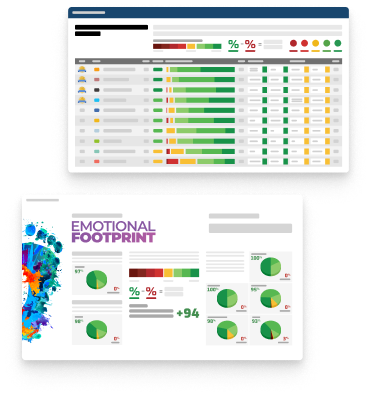
+89 Net Emotional Footprint
The emotional sentiment held by end users of the software based on their experience with the vendor. Responses are captured on an eight-point scale.
How much do users love Microsoft Project?
Pros
- Enables Productivity
- Efficient Service
- Security Protects
- Helps Innovate
How to read the Emotional Footprint
The Net Emotional Footprint measures high-level user sentiment towards particular product offerings. It aggregates emotional response ratings for various dimensions of the vendor-client relationship and product effectiveness, creating a powerful indicator of overall user feeling toward the vendor and product.
While purchasing decisions shouldn't be based on emotion, it's valuable to know what kind of emotional response the vendor you're considering elicits from their users.
Footprint
Negative
Neutral
Positive
Feature Ratings
List Tasks
Task Assignment
Dependencies
Task Prioritization
Shared Task List
Task Reporting
Task Status
Task Categorization
Add Notes
Due Dates
Automated Workflow
Vendor Capability Ratings
Ease of Implementation
Quality of Features
Business Value Created
Breadth of Features
Ease of IT Administration
Availability and Quality of Training
Vendor Support
Ease of Customization
Ease of Data Integration
Usability and Intuitiveness
Product Strategy and Rate of Improvement
Also Featured in...
Microsoft Project Reviews

Bheem V.
- Role: Information Technology
- Industry: Technology
- Involvement: End User of Application
Submitted Oct 2026
Easy to Track Project Timeline
Likeliness to Recommend
What differentiates Microsoft Project from other similar products?
Microsoft Project's scheduling and timeline visualization capabilities help keep planning organized from project inception to completion.
What is your favorite aspect of this product?
For me, the Gantt chart is the most useful part. It makes it easy to understand the project schedule, task duration, and relationships between activities at a glance.
What do you dislike most about this product?
When a project changes frequently, it requires regular effort to keep the schedule and task details updated.
What recommendations would you give to someone considering this product?
Project managers should set realistic timelines and milestones at the outset. Regular progress updates will keep the schedule more accurate.
Pros
- Helps Innovate
- Reliable
- Trustworthy
- Unique Features
Please tell us why you think this review should be flagged.

Hiten M.
- Role: Information Technology
- Industry: Engineering
- Involvement: End User of Application
Submitted Jul 2026
Powerful project management tool ever
Likeliness to Recommend
What differentiates Microsoft Project from other similar products?
It is different because it has integration with microsoft 365, teams, powerBI etc. making it easy to manage projects without switching between different tools. it is easy to get the advanced scheduling, resource management and stuff. overall great performance !
What is your favorite aspect of this product?
my favorite aspect is the detailed project planning and scheduling capabilities. creating timelines assigning resources, tracking milestones and monitoring project progress are great !
What do you dislike most about this product?
the downside is that it can feel overwhelming for new users because of the number of features and configuration options available. But it is overall easy and great.
What recommendations would you give to someone considering this product?
if your organization already uses microsoft tools like microsoft 365 and manages complex projects, this tool is for you ! just try it !
Pros
- Helps Innovate
- Continually Improving Product
- Reliable
- Performance Enhancing
Please tell us why you think this review should be flagged.

Santhosh T.
- Role: Operations
- Industry: Manufacturing
- Involvement: End User of Application
Submitted May 2026
Professional tool for project tracking and progres
Likeliness to Recommend
What differentiates Microsoft Project from other similar products?
Option to assign the task in the sequence to the users from organisation official IM Which in most cases is Ms TEAMS
What is your favorite aspect of this product?
Option to add predecessor and successor task with auto update of the task timelines
What do you dislike most about this product?
Difficulty to build new project tasks from existing tasks
What recommendations would you give to someone considering this product?
Perfect tool for team collaboration and project management
Pros
- Reliable
- Enables Productivity
- Trustworthy
- Efficient Service
Please tell us why you think this review should be flagged.



Get Instant Access<br>to this Report
Get Instant Access
to this Report
Unlock your first report with just a business email. Register to access our entire library.
© 2026 SoftwareReviews.com. All rights reserved.