Microsoft OneDrive for Business
What is Microsoft OneDrive for Business?
OneDrive connects you to all your files in Office 365 so you can share and work together from anywhere while protecting your work.
Company Details
Need Assistance?
We're here to help you with understanding our reports and the data inside to help you make decisions.
Get AssistanceMicrosoft OneDrive for Business Ratings
Real user data aggregated to summarize the product performance and customer experience.
Download the entire Product Scorecard
to access more information on Microsoft OneDrive for Business.
Product scores listed below represent current data. This may be different from data contained in reports and awards, which express data as of their publication date.
89 Likeliness to Recommend
98 Plan to Renew
1
Since last award
85 Satisfaction of Cost Relative to Value
1
Since last award
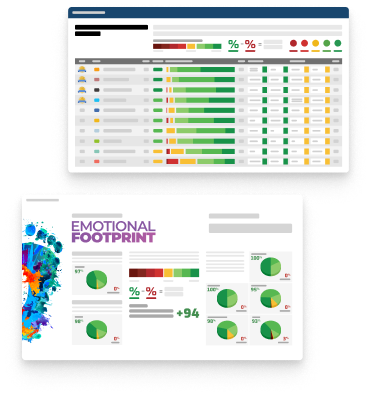
Emotional Footprint Overview
Product scores listed below represent current data. This may be different from data contained in reports and awards, which express data as of their publication date.
+91 Net Emotional Footprint
The emotional sentiment held by end users of the software based on their experience with the vendor. Responses are captured on an eight-point scale.
How much do users love Microsoft OneDrive for Business?
Pros
- Enables Productivity
- Reliable
- Performance Enhancing
- Security Protects
How to read the Emotional Footprint
The Net Emotional Footprint measures high-level user sentiment towards particular product offerings. It aggregates emotional response ratings for various dimensions of the vendor-client relationship and product effectiveness, creating a powerful indicator of overall user feeling toward the vendor and product.
While purchasing decisions shouldn't be based on emotion, it's valuable to know what kind of emotional response the vendor you're considering elicits from their users.
Footprint
Negative
Neutral
Positive
Feature Ratings
Team Collaboration
File Upload & Access
File Synchronization
Enterprise Grade Security Controls
Data Loss Prevention
Access Control and Rights Management
Mobile and Cross-Platform Access
Audit Trail
Electronic Signatures
AI-Assisted Content Services
Large-File Support and Transfer Acceleration
Vendor Capability Ratings
Business Value Created
Ease of IT Administration
Ease of Implementation
Ease of Data Integration
Breadth of Features
Quality of Features
Usability and Intuitiveness
Product Strategy and Rate of Improvement
Ease of Customization
Availability and Quality of Training
Vendor Support
Microsoft OneDrive for Business Reviews
Nikitesh B.
- Role: Consultant
- Industry: Technology
- Involvement: IT Development, Integration, and Administration
Submitted Aug 2026
Seamless Microsoft 365 File Collaboration
Likeliness to Recommend
What differentiates Microsoft OneDrive for Business from other similar products?
OneDrive for Business stands out through deep Microsoft 365 integration, seamless Office collaboration, Windows File Explorer access, enterprise security, governance, and Copilot. It combines storage, productivity, and collaboration in one ecosystem.
What is your favorite aspect of this product?
My favorite aspect is its seamless integration with Microsoft 365. Files are easily accessible across Teams, Outlook, Office apps, and Windows, making collaboration simple without constantly switching between different tools.
What do you dislike most about this product?
My biggest dislike is that OneDrive can become confusing when combined with SharePoint and Teams. It can be difficult for users to understand where files are actually stored, especially with shared folders, permissions, synchronization, and multiple copies.
What recommendations would you give to someone considering this product?
If your organization already uses Microsoft 365, OneDrive for Business is a strong choice. Evaluate storage, permissions, security, sync performance, and SharePoint integration first. Also, clearly define when to use OneDrive versus SharePoint for personal and team content.
Pros
- Performance Enhancing
- Helps Innovate
- Reliable
- Enables Productivity
Please tell us why you think this review should be flagged.
kashi s.
- Role: Public Sector
- Industry: Agriculture
- Involvement: Vendor Management and Renewal
Submitted Aug 2026
Dependable document collaboration platform
Likeliness to Recommend
What differentiates Microsoft OneDrive for Business from other similar products?
Microsoft OneDrive for Business stands out because of its seamless integration with Microsoft 365 applications such as Teams, Outlook, SharePoint, and Office. Team members can collaborate on documents in real time, manage version history, and securely share files without leaving their existing workflow. The synchronization performance is reliable across desktop and mobile devices, and built-in security and compliance capabilities make it suitable for organizations handling sensitive information while still providing good value as part of the Microsoft ecosystem.
What is your favorite aspect of this product?
The biggest advantage is the ability to collaborate on documents without creating multiple versions of the same file. Automatic synchronization, version history, offline access, and real-time co-authoring make it easy for distributed teams to work together efficiently. The interface is familiar for Microsoft users, onboarding is straightforward, and recent AI-powered Microsoft 365 capabilities have made finding and managing documents even more efficient.
What do you dislike most about this product?
Large folder synchronization can occasionally become slow, and permission management for shared files can be confusing for non-technical users. Search usually works well, but finding older documents can still require careful filtering. More flexible external sharing controls, clearer storage management, and additional AI-powered file organization would further improve the overall experience, especially for organizations managing large document libraries.
What recommendations would you give to someone considering this product?
OneDrive for Business delivers the most value when it is deployed as part of Microsoft 365 rather than as a standalone storage solution. Plan a clear folder structure, define file-sharing permissions early, and provide users with basic onboarding on collaboration and version history. Organizations that take time to establish governance and train users generally achieve better productivity, stronger security, and a higher return on their investment.
Pros
- Helps Innovate
- Reliable
- Caring
- Saves Time
Please tell us why you think this review should be flagged.

Almara W.
- Role: Operations
- Industry: Energy
- Involvement: End User of Application
Submitted Jun 2026
Ease of Use
Likeliness to Recommend
What differentiates Microsoft OneDrive for Business from other similar products?
I used box before using Microsoft OneDrive. I didn't necessarily have an issue with box but one thing I love about OneDrive is the integration with SharePoint and how both programs talk to each other.
What is your favorite aspect of this product?
It's very efficient and easy to use. Considering my role and needing to move very fast at points, this is very helpful for me.
What do you dislike most about this product?
Sometimes the documents don't load properly and it can slow me down a bit.
What recommendations would you give to someone considering this product?
I don't really have any recommendations at the moment.
Pros
- Reliable
- Performance Enhancing
- Enables Productivity
- Effective Service
Please tell us why you think this review should be flagged.






Get Instant Access<br>to this Report
Get Instant Access
to this Report
Unlock your first report with just a business email. Register to access our entire library.
© 2026 SoftwareReviews.com. All rights reserved.