What is ClickUp?
Build ClickUp into your own mission control center - small team or large team, simple workflows or complex workflows. One platform for everything. Bring everything together in one centralized place to manage all your productivity needs and track progress with custom Dashboards.
Company Details
Need Assistance?
We're here to help you with understanding our reports and the data inside to help you make decisions.
Get AssistanceClickUp Ratings
Real user data aggregated to summarize the product performance and customer experience.
Download the entire Product Scorecard
to access more information on ClickUp.
Product scores listed below represent current data. This may be different from data contained in reports and awards, which express data as of their publication date.
89 Likeliness to Recommend
97 Plan to Renew
86 Satisfaction of Cost Relative to Value
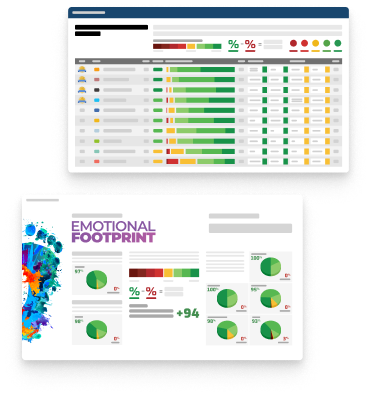
Emotional Footprint Overview
Product scores listed below represent current data. This may be different from data contained in reports and awards, which express data as of their publication date.
+97 Net Emotional Footprint
The emotional sentiment held by end users of the software based on their experience with the vendor. Responses are captured on an eight-point scale.
How much do users love ClickUp?
Pros
- Reliable
- Performance Enhancing
- Trustworthy
- Efficient Service
How to read the Emotional Footprint
The Net Emotional Footprint measures high-level user sentiment towards particular product offerings. It aggregates emotional response ratings for various dimensions of the vendor-client relationship and product effectiveness, creating a powerful indicator of overall user feeling toward the vendor and product.
While purchasing decisions shouldn't be based on emotion, it's valuable to know what kind of emotional response the vendor you're considering elicits from their users.
Footprint
Negative
Neutral
Positive
Feature Ratings
Artificial Intelligence and Natural Language Processing
Grammar and Spellcheck
Data Analysis
Customization
Content Summarization
Social Media Integration
Text-To-Image
Content Editor
Translation
Image and Video Generation
Data Protection and Security
Vendor Capability Ratings
Usability and Intuitiveness
Business Value Created
Vendor Support
Quality of Features
Ease of Data Integration
Ease of Implementation
Ease of IT Administration
Availability and Quality of Training
Ease of Customization
Product Strategy and Rate of Improvement
Breadth of Features
Also Featured in...
Product Management
Score 9.0
View ClickUp in this category (opens in a new tab)
Task Management
Score 9.0
View ClickUp in this category (opens in a new tab)
Project Management - Enterprise
Score 9.0
View ClickUp in this category (opens in a new tab)
Objectives and Key Results
Score 8.6
View ClickUp in this category (opens in a new tab)
ClickUp Reviews

Allen C.
- Role: Sales Marketing
- Industry: Healthcare
- Involvement: End User of Application
Submitted Jan 2025
From Words to Workflows
Likeliness to Recommend
What differentiates ClickUp from other similar products?
ClickUp sets itself apart with its comprehensive platform that brings together task management, time tracking, documentation, and team collaboration tools. One of its most impressive features is its extensive customization options, which include various views such as List, Board, Gantt, and Calendar, as well as adaptable statuses and workflows designed for any team. The platform is also very cost-effective, providing robust functionality even in its free plan, making it perfect for individuals and small teams.
What is your favorite aspect of this product?
One of the standout features of ClickUp is its remarkable versatility and customization options. The platform provides a wide range of features, including multiple task views (List, Board, Gantt, Calendar), customizable workflows, and integrations with various tools, enabling teams to adapt their experience to fit specific needs. Tools for goal tracking, time management, and automation help streamline complex projects, while the documentation and real-time collaboration features promote effective teamwork.
What do you dislike most about this product?
Prices can sometimes feel a bit steep. The integrations work fine, but I found myself going back and forth through the documentation when I tried using Clickup and Slack, which should have been straightforward. It would be more useful to create tickets from regular messages instead of only messages within a thread, which isn't possible. The Gantt chart barely functions, and the schedules don’t even roll up to parent tasks, so the basic features are either missing or very limited, making rescheduling a challenge. It's important to look at how MS Project manages scheduling, user access, and licensing if you want to stay competitive.
What recommendations would you give to someone considering this product?
If you're thinking about using ClickUp, it's a good idea to start with the free plan to get a feel for its wide range of features, such as task management, various views, and integrations. You can tailor workflows to match your team's needs and try out different views like List, Board, Gantt, and Calendar to see which one you prefer. Take advantage of ClickUp’s templates to save time, and connect it with tools like Slack or Google Drive for smoother collaboration.
Pros
- Helps Innovate
- Continually Improving Product
- Reliable
- Performance Enhancing
Please tell us why you think this review should be flagged.

Manokh H.
- Role: Information Technology
- Industry: Engineering
- Involvement: Business Leader or Manager
Submitted Nov 2024
It is a very good product.
Likeliness to Recommend
What differentiates ClickUp from other similar products?
ClickUp is unique because it brings everything—task management, time tracking, goal setting, and team communication—together in one place, so you don’t need to juggle multiple tools. It’s also incredibly flexible, allowing you to set up workflows and views like lists, boards, Gantt charts, or calendars to match your style of working. With affordable pricing and a solid free plan, it’s a practical choice for teams big and small looking to streamline their work.
What is your favorite aspect of this product?
What I really love about ClickUp is its fantastic flexibility. It allows you to customise workflows, views, and dashboards to match your team’s needs, making project management a breeze. Whether you prefer working with lists, boards, or Gantt charts, ClickUp lets you set things up in a way that feels right for you. Plus, having everything in one place—from task assignments to team communication—means you don’t have to juggle multiple tools, which really helps with productivity. This adaptability truly makes it easier for teams to collaborate effectively and stay organised.
What do you dislike most about this product?
I like this product. No dislike for this product from my side.
What recommendations would you give to someone considering this product?
1. Explore the Features 2. Start with Templates 3. Customize Your Workspace 4. Utilise Integrations 5. Invest Time in Training 6. Stay Organised 7. Engage with the Community
Pros
- Helps Innovate
- Continually Improving Product
- Reliable
- Performance Enhancing
Please tell us why you think this review should be flagged.

Sarah L.
- Role: Operations
- Industry: Biotechnology
- Involvement: End User of Application
Submitted Oct 2024
Easy to use product!
Likeliness to Recommend
What differentiates ClickUp from other similar products?
Easy of use and ability to share
What is your favorite aspect of this product?
Ease of use
What do you dislike most about this product?
Date changes with dependencies
What recommendations would you give to someone considering this product?
Would be great for software development
Pros
- Reliable
- Enables Productivity
- Continually Improving Product
- Performance Enhancing
Cons
- Commodity Features
Please tell us why you think this review should be flagged.






Get Instant Access<br>to this Report
Get Instant Access
to this Report
Unlock your first report with just a business email. Register to access our entire library.
© 2026 SoftwareReviews.com. All rights reserved.